Question: In microservice environment, how does one service know where the other service is located at?
Service discovery provides:
- A way for a service to register itself.
- A way for a service to de-register itself.
- A way for a client to find other services.
- A way to check the health of a service and remove unhealthy instances.
Multiple ways to discover services in Spring Cloud:
- Spring Cloud Consul
- Spring Cloud Zookeeper
- Spring Cloud Netflix
Service Discovery Key Components
AI-generated
Service Discovery Flow
- Service Registers
- Client looks up service location
- Discovery server sends back service location
- Client-Service connection is established.
Service Discovery Components: Discovery Server
- An actively managed registry for service locations.
- Source of truth.
- One or more instances.
Using Spring Cloud Eureka Server
pom.xml
<dependencyManagement>
  <dependencies>
    <dependency>
      <groupId>org.springframework.cloud</groupId>
      <artifactId>spring-cloud-dependencies</artifactId>
      <version>Camden-SR2</version>
      <type>pom</type>
      <scope>import</scope>
    </dependency>
  </dependencies>
</dependencyManagement>
pom.xml
<dependency>
  <groupId>org.springframework.cloud</groupId>
  <artifactId>spring-cloud-starter-eureka-server</artifactId>
</dependency>
application.properties
spring.application.name=my-discovery-server
OR application.yml
spring:
  application:
    name: my-discovery-server
Application.java
@SpringBootApplication
@EnableEurekaServer
public class Application {

  public static void main(String[] args) {
    SpringApplication.run(Application.class, args);
  }
}
Using Spring Cloud Eureka Server:
- Just add the
@EnableEurekaServeron the main class. That’s it, the Eureka discover server is ready and we can start the server application. - It will try to register itself with the peer-servers (for high availability we tend to run multiple servers).
- Disable peer registration and registry fetching for a standalone local server.
Configurations:
spring.application.name: a unique name for the applicationeureka.client.register-with-eureka: boolean, means if we want to register self with a peer eureka server.eureka.client.fetch-registry: boolean, if we want to fetch existing registry from a peer discovery server.server.port: default eureka server port is 8761
Service Discovery Components: Application Service
User of the Service discovery client.
Using Spring Cloud Eureka Client
pom.xml
<dependencyManagement>
  <dependencies>
    <dependency>
      <groupId>org.springframework.cloud</groupId>
      <artifactId>spring-cloud-dependencies</artifactId>
      <version>Camden-SR2</version>
      <type>pom</type>
      <scope>import</scope>
    </dependency>
  </dependencies>
</dependencyManagement>
pom.xml
<dependency>
  <groupId>org.springframework.cloud</groupId>
  <artifactId>spring-cloud-starter-eureka</artifactId>
</dependency>
application.properties
spring.application.name=my-service
eureka.client.service-url.defaultZone=http://localhost:8761/eureka
OR application.yml
spring:
  application:
    name: my-service
eureka:
  client:
    service-url:
      defaultZone: http://localhost:8761/eureka
Application.java
@SpringBootApplication
@EnableDiscoveryClient
public class Application {

  public static void main(String[] args) {
    SpringApplication.run(Application.class, args);
  }
}
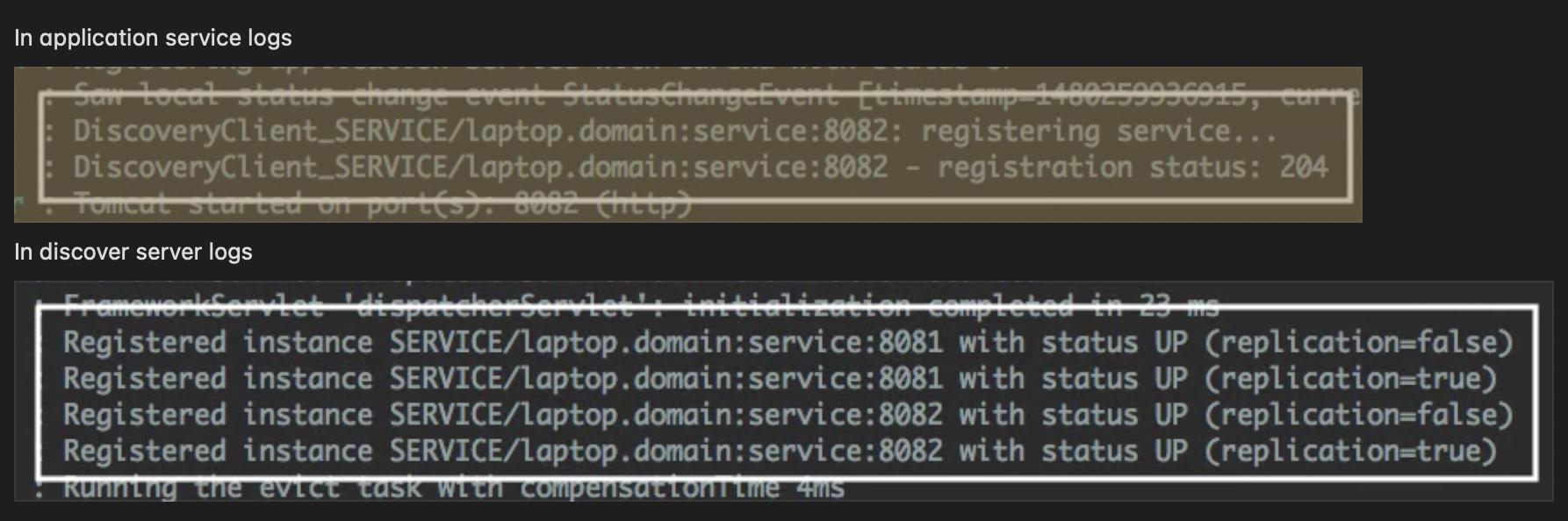
Service discovery logs on both client and server side:
Service Discovery Components: Application Client
- Calls another application service to implement its functionality.
- User of discovery client.
NOTE:
- It makes sense for an application to be both a service and a client.
- Only difference with service is in the configuration as it has
eureka.client.register-with-eurekato false. A Client doesn’t need anybody to discover it!
Discovering Services as a Client: Two Options
1. Eureka Server Specific:
@Inject
EurekaClient client
2. Discovery Server Agnostic:
/* Spring Discovery Client */

@Inject
DiscoveryClient client
Using the EurekaClient
InstanceInfo instance =
  eurekaClient.getNextServerFromEureka("service-id", false);
getNextServerFromEureka - pick the next instance using round-robin.
- 1st argument - virtual hostname or service id of service to call.
- By default, apps use the
spring.application.nameas their virtual hostname when registering. - 2nd argument - whether or not this is secure request.
Using the DiscoveryClient
List<ServiceInstance> instances =
  client.getInstances("service-id");

String baseUrl = instances.get(0).getUri().toString();
getInstances - return all instances of the given service id
Eureka Additional
Eureka Dashboard
Enabled by default
eureka.dashboard.enabled=true
Displays useful metadata and service status.
Eureka Configuration
eureka.server.*- EurekaServerConfigBeaneureka.client.*- EurekaClientConfigBeaneureka.instance.*- EurekaInstanceConfigBean
Other Features
- Service Health
- Regularly checks the status of the services.
- Clients send heartbeats every 30 sec (default).
- Services removed after 90 sec of no heartbeats (defaults).
- Can customize configuration to use
/healthendpoint.eureka.client.healthCheck.enabled - The registry is distributed (cached locally on every client).
- Clients can operate without discovery server.
- Fetches deltas to update registry.
- AWS aware
- AWS-specific instance deltas.
- Elastic IP bindings.
- Multi-zone aware.
- Multi-region aware.